f3a9c2e
<aGiTrack> show, don't tell
agitrack · claude · session-1 → main
$ agitrack
┌ claude · session-1 ──────────────────────────────────┐
> add a --version flag to the cli
  · editing agitrack/cli.py …
  · added --version using importlib.metadata
└──────────────────────────────────────────────────────┘
✓ Created <aGiTrack> commit 4b2f31a.            aGiTrack · Ctrl-G
$ git log --oneline -2
4b2f31a <aGiTrack> add a --version flag to the cli
a91c07e Initial commit
$ git show 4b2f31a --stat
<aGiTrack> add a --version flag to the cli
 agitrack/cli.py | 6 ++++++  trace + model + token cost in the body ↓
9d04e17
why this exists
Agent code without provenance is unreviewable.
An agent edits twelve files while you get coffee; a week later nobody knows which prompt produced
which change. aGiTrack makes each agent turn a commit, so review, blame, bisect, and
revert just work.
git show: an aGiTrack commit message
<aGiTrack> add a --version flag to the cli

# Interaction Trace

## User
add a --version flag to the cli

## Agent
Added --version using the package metadata; prints and exits.

# aGiTrack Metadata
commit_type: agent
backend: claude
model: claude-opus-4-8
session_name: session-1
context_tokens: 18204
tokens_since_last_commit_input: 411
tokens_since_last_commit_output: 2390
b7e1d09
<aGiTrack> see the whole repo at a glance
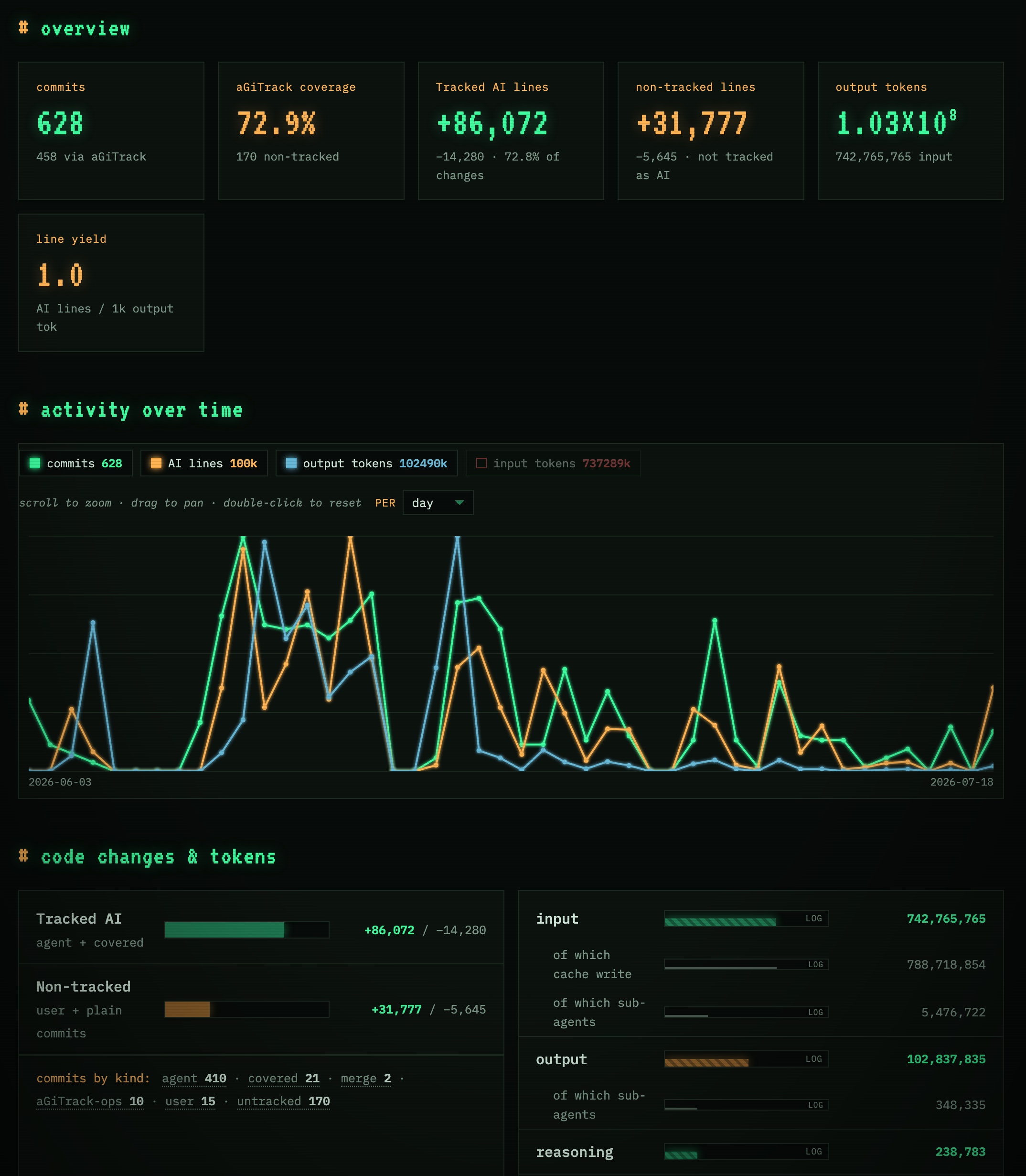
A live dashboard of what the agents did.
agitrack -d opens a live dashboard on localhost. Every number comes
from commit metadata alone: identical on every clone, no database, no server.
Explore the demo: this dashboard, on aGiTrack's own repo.
agitrack -d · localhost
4c0ba91
<aGiTrack> surface how the agents are being driven
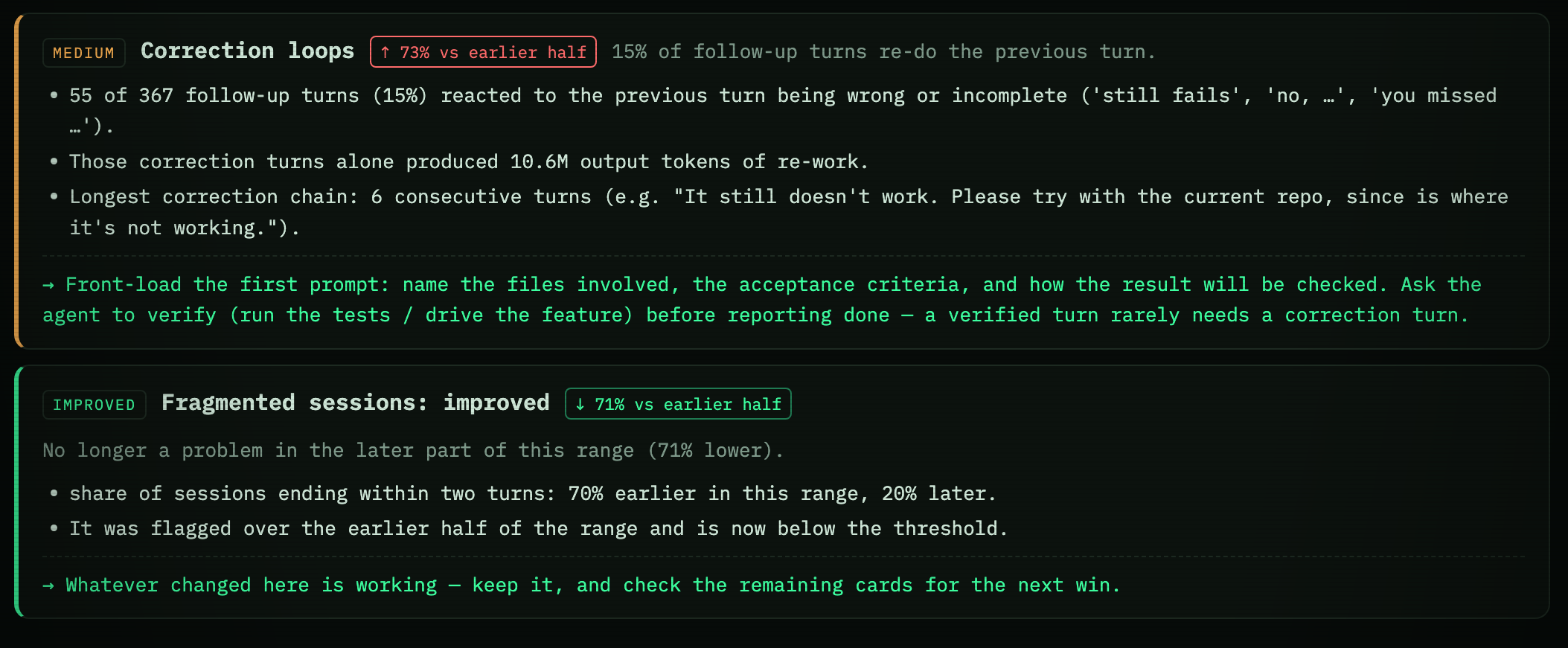
Not how much it wrote. How well you drove it.
It spots the habits that quietly cost time and tokens, correction loops, rework hotspots, ballooning
context, and flags each one improving or getting worse, backed by the numbers.
agitrack -d · agent efficiency
7e3d052
<aGiTrack> coach the human from their own traces
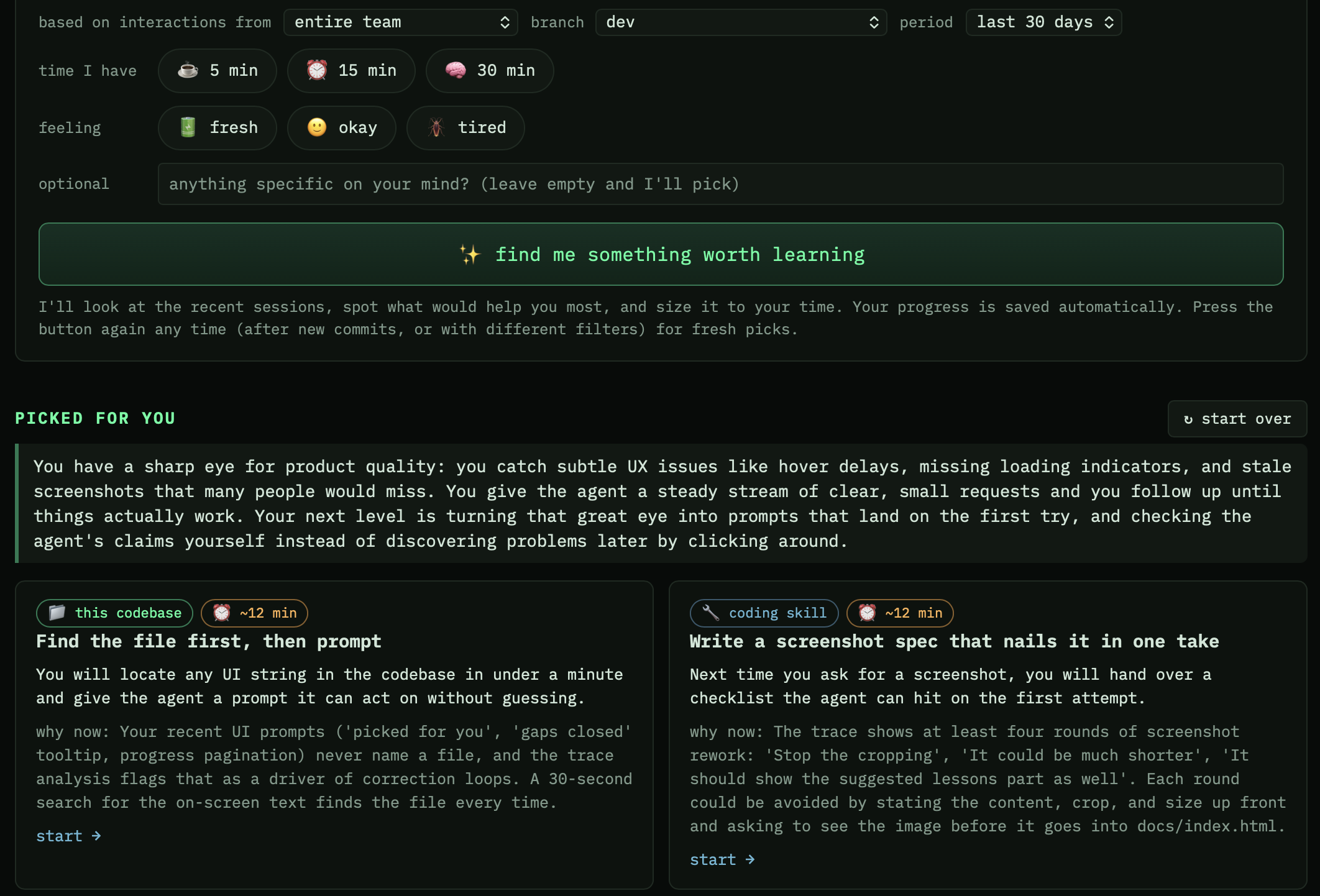
It teaches you back.
Tell the learn page how much time you have. Your own agent reads your traces, spots
your gaps, and writes short lessons on driving agents and on your own codebase, each with a quick check
and an exercise it reviews. See real lessons the coach
wrote for this repo's maintainer.
agitrack -d · learn
c5b7e34
<aGiTrack> tell the repo's history as a story
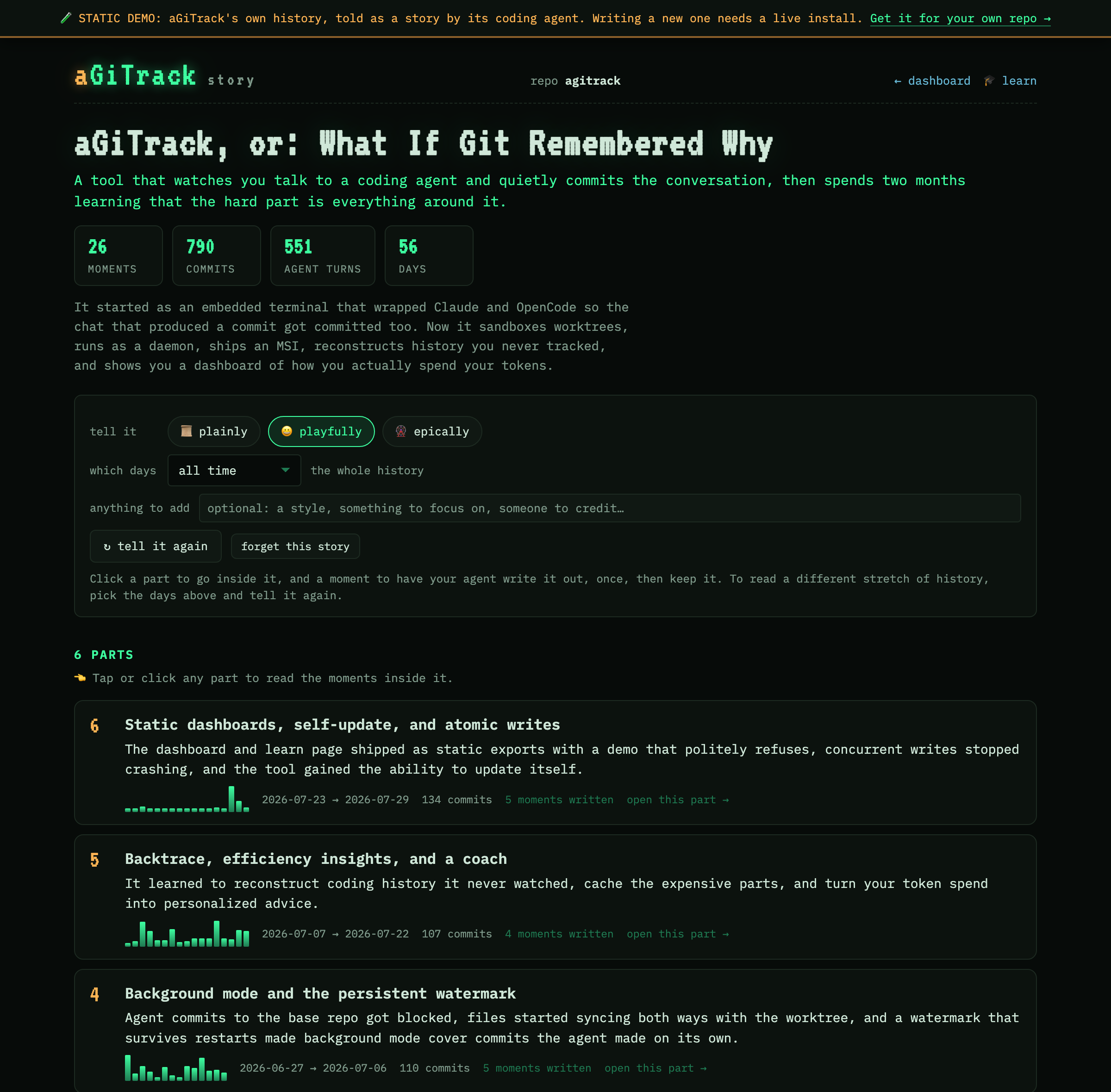
Ask your repo how it got here.
A commit log tells you what changed. The story page tells you what the project was
trying to do, and how that changed: your own agent reads the whole history and lays it out as a
handful of parts, then the moments inside each one. Open a moment and you
get the telling, the prompts someone actually typed at the time, and the commits that came out of it.
Written on demand, one part at a time, and kept in your repo.
Read this repo's own story, told by the agent that built it.
agitrack -d · story
a1f8b28
<aGiTrack> reconstruct history from past sessions
Didn't use it from day one? See the history anyway.
Built your project with an agent before aGiTrack? agitrack --backtrace
reconstructs those sessions from the transcripts already on your machine, into the same
dashboard.
agitrack --backtrace
serves the dashboard from local transcripts, even outside a git repo
agitrack --backtrace commit
bakes the reconstruction into real commits on a new branch
agitrack --share-sessions
pushes every local session to the repo's remote, so the backtrace can span machines
Transcripts only live on the machine that recorded them, so a plain backtrace shows
one laptop's view. Run agitrack --share-sessions and everyone's sessions go
to the repo's remote in one pass; the backtrace then pulls them all back and reconstructs the
whole project, attributing each turn to the GitHub id that shared it, which a transcript alone
can never tell you. A fresh clone with no local transcripts rebuilds the entire history.
Details in the docs.
Two views of the same project.
Not a separate tool: one click apart in the dashboard header, on the story and learn pages too.
Tracked
What aGiTrack recorded: the prompts, replies and tokens behind exactly those
lines.
Backtrace
What can be reconstructed. Kept separate and labelled as inferred, because it
is less accurate.
One dashboard serves every project on one port, and opens itself when
aGiTrack starts. The repository list shows which of them are being tracked.
b4ck3nd
supported backends
Bring your own coding agent.
aGiTrack wraps the coding agent you already use. Supported today:
- ▸ Claude Code agitrack --backend claude
- ▸ Codex agitrack --backend codex
- ▸ OpenCode agitrack --backend opencode
Want a different backend? Request one.
a11m0de
pick your workflow
Several ways to run it, and it asks.
Run agitrack with no arguments and it shows you the modes: arrow keys to move,
Enter to choose, each one with what it is for and the command that goes straight there next time.
Every mode produces the same per-turn trace, and you can switch freely.
Background · Auto default
Drive the agent from any UI, desktop app, IDE, or chat window; aGiTrack tracks it
headlessly and commits each turn. Your terminal stays yours.
Background · Manual
Headless tracking, commits on your terms. It can even start itself on
git commit.
Interactive · Worktree
The agent's real TUI, working in an isolated worktree whose finished turns are
merged back, so several sessions can run at once without standing on each other.
Interactive · Your tree
The same TUI, but the agent edits your current branch directly: every change is visible live
in your editor. One session at a time.
Interactive · Manual
Feels like plain git: you commit when ready, and pending turns fold in with the
full AI trace.
One way to stop
Whatever is holding the repository, agitrack stop stops it: the background
tracker, an interactive session, this repo's dashboard. No need to remember which mode you picked.
e8d2fa0
install & run
Three commands to the first traced commit.
pip install agitrack
Python ≥ 3.10 · or pipx install agitrack
cd your-repo && agitrack
asks which mode you want, then starts it and opens the dashboard
Ctrl-G
opens the aGiTrack menu
Prompt as usual. When the turn settles, the commit is already there. Also a
VS Code extension, one click, same experience.
HEAD
<aGiTrack> your move
Put your agents on the record.
Apache-2.0. Issues, ideas, and first contributions welcome.